
“A quick guide to downloading Canon Creative Park templates directly — no printer setup or app required”
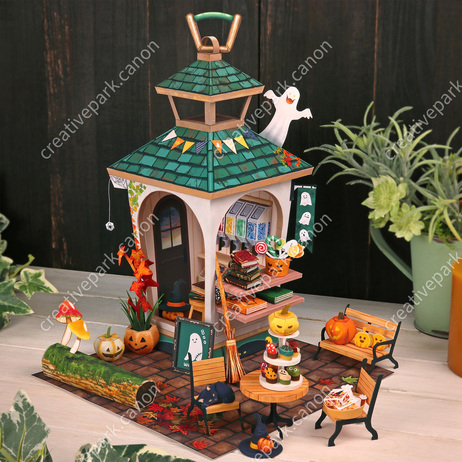
!***This workaround doesn’t work anymore as Canon has fixed the loophole***!
Canon Creative Park recently changed how downloads work — now you need the Canon Print app and a connected Canon printer to get the templates to work. So here’s a little shortcut so that you can bypass straight to the download link with a simple tweak!
HOW TO GET THE DIRECT PDF LINK:
For this demo, I picked the Halloween Miniature World paper model from Canon’s Creative Park.
Here’s the page link on their website:
👉 https://creativepark.canon/en/contents/CNT-0030285/index.html
To get direct access to the PDF file, you just need to slightly change the link at the top of your browser.
Replace the URL with this version:
👉 https://creativepark.canon/downloads/contents/CNT-0030285/CNT-0030285-01.pdf
Here’s how it works:
- Each model on the site has a unique code in the URL (it looks like
CNT-0030285). - That code identifies the project — you can swap it out for any other model’s code.
The basic format looks like this:
https://creativepark.canon/downloads/contents/HERE/HERE-01.pdf
💡 Tip:
-02.pdf → opens the instructions-01.pdf → opens the model template
Hope this helps anyone that doesn’t own a canon printer! Thank you for reading and happy crafting!


Leave a Reply to Giulia Cancel reply